

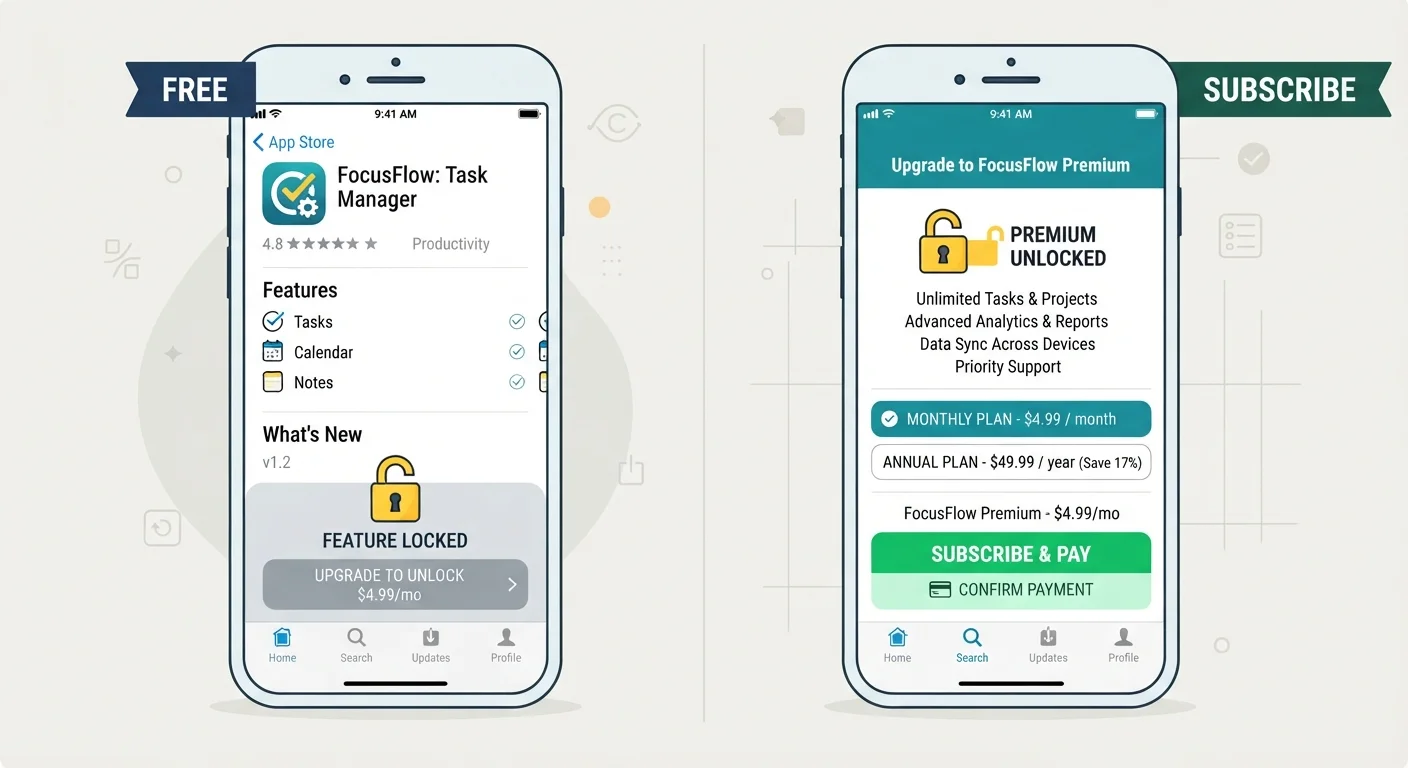
Key Takeaways
- Freemium apps are free to download but lock advanced features behind one-time or recurring payments.
- Subscription apps charge a recurring fee - monthly or annually - for full access to the product.
- Neither model is inherently better; value depends on how often and how deeply you use the app.
- Trial periods on subscription apps let you test full functionality before committing.
- Freemium models can cost more over time if you accumulate multiple in-app purchases.
- Always review what renews automatically to avoid unexpected charges on either model.
Option A
Freemium Apps
The free entry point with paid upgrade paths.
Best for: Users who want to try an app before committing or who only need basic functionality long-term.
Option B
Subscription Apps
Full access in exchange for recurring payment.
Best for: Users who need complete, uninterrupted access to all features and prefer predictable pricing.
If you only need occasional or basic app functionality
Freemium Apps
Freemium tiers often cover casual use cases well without requiring any payment. You can get genuine value without ever upgrading.
If you rely on an app daily for work or productivity
Subscription Apps
A subscription unlocks everything upfront, so you're never blocked by paywalls mid-task. The predictable cost is easier to budget.
If you want to test a tool before spending money
Freemium Apps
Freemium gives you indefinite access to the core product, which is more revealing than a short trial window.
If you want the full feature set with no surprises
Subscription Apps
Subscriptions typically include all features, updates, and support in one price - no piecemeal unlocks required.
How Each Pricing Model Actually Works
When you download an app labeled "Free," it almost certainly falls into one of two business models: freemium or subscription. The distinction matters because it shapes what you can do, what gets locked away, and ultimately what you might pay.
Freemium apps are free to install and use at a basic level. Developers monetize by restricting features, removing ads, increasing storage limits, or unlocking premium content - all available only after a separate purchase. That purchase might be a one-time upgrade, a consumable (like credits or tokens), or a recurring subscription bolt-on.
Subscription apps may offer a short free trial, but they require an active, recurring payment - monthly or annually - to function fully. Once the trial or billing period ends without renewal, access is reduced or cut off entirely.
Understanding this difference upfront helps you evaluate the true cost of "free" apps before you're already invested in one.
| Criterion | Freemium Apps | Subscription Apps |
|---|---|---|
| Upfront cost | Free to download | Free trial, then recurring fee |
| Feature access | Partial - upgrades unlock more | Full access while subscribed |
| Payment structure | One-time purchases or add-ons | Monthly or annual renewal |
| Long-term cost predictability | Variable - depends on add-ons | Fixed and predictable |
| Risk if you stop paying | Keep features already purchased | Access reduced or removed |
| Best trial experience | Unlimited time on free tier | Full features for limited period |
What Each Model Typically Locks Away
The specific features behind each paywall vary widely by app category, but patterns emerge across both models.
In freemium apps, you'll commonly find these locked:
- Export options (saving files without a watermark, for example)
- Cloud sync or backup across multiple devices
- Advanced editing tools, filters, or templates
- Ad removal
- Usage caps - such as a limited number of AI queries or document scans per month
In subscription apps, the free tier (if it exists) is often just a timed preview. The subscription itself typically unlocks:
- All current and future features as they're released
- Priority customer support
- Collaboration or multi-user access
- Offline mode or cross-platform access
Before subscribing or upgrading, it's also worth reviewing what data access you're granting. Our guide on what app permissions actually mean explains how to evaluate those access requests critically.
97%
Share of App Store revenue from free apps
According to Apple's App Store data, the vast majority of revenue comes from apps that are free to download, including freemium and subscription models.
~2-3%
Average freemium conversion rate
Industry research consistently shows that only a small fraction of freemium app users ever convert to a paid tier, which shapes how developers design their paywalls.
Evaluating Real Value: Questions to Ask Before You Pay
Neither model is universally better - the right choice depends on your actual usage patterns. Before committing to either, work through these questions:
- How often will I use this app? Daily users typically extract more value from a full-access subscription than occasional users who might never need the premium tier.
- Does the free tier genuinely cover my needs? Some freemium apps are generous; others are so limited they're barely functional without an upgrade. Test before deciding.
- What is the total cost over 12 months? A freemium app with multiple separate unlocks can exceed the annual cost of a comparable subscription app. Do the math explicitly.
- Is this a subscription I'll remember? Auto-renewing charges are easy to forget. Our related guide covers subscriptions you might be paying for without realizing it - worth a read before adding another recurring charge.
- Does the app offer a meaningful trial? A 7-day trial on a complex productivity tool may not be enough time to assess genuine fit. Look for 14- or 30-day options where available.
Annual Plans Often Offer Lower Total Cost
Most subscription apps offer a discounted annual plan compared to paying month-to-month. If you've used a free trial and are confident in the app's value, the annual option usually saves money. However, annual plans are harder to cancel mid-term for a refund, so be certain before committing. Check the app's refund policy before purchasing.